Monday, 25 March 2013

Unlock huawei e1732 idea netsetter permanently

Unlock huawei e1732 idea netsetter permanently

Before starting unlocking you need following two software.So download it first and Extract it.

   CDMA Workshop      Download
   E1732 Downgrader     Download
   Mobile Partner 23       Download    
Follow :

Unlocking of Huawei E1732 can be done in 3 portion,Here we have to downgrade the firmware of the modem because the idea 7.2 mbps modem comes with customized Firmware.
 Right click on you My Computer
 >Select Properties
 >Select Device Manager
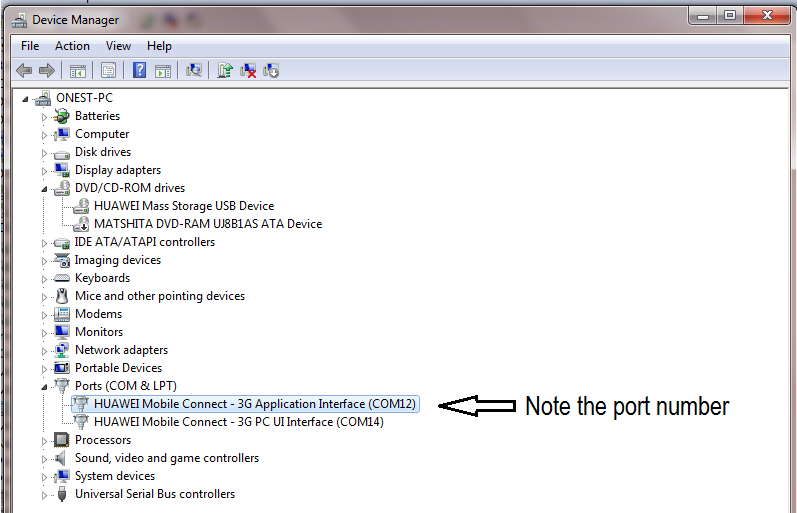
Now device manager window appears,Select Ports(COM & LPT)
Refer following screenshot and select Huawei Mobile Connect – 3G Application interface
and Note down the Post No. (Here Any Port
)

====>

Now Run CDMA Workshop.Exe From  CDMA_Workshop and  Click on Main and select the com port number in COM Settings (AT mode) which you have note down in above step. After that click on Connect Select button.Don’t forget to check status !! It must shows ready if you have selected correct com port.


Now navigate to Memory tab and click on Read button. Instantly Confirm pop up box appears;Here Click On OK button as shown in below screenshot. 


          After that on more box appears,Here Set Last NV item to 9999
j    
               After that Save as box appears, Here you have to save Nv Backup file to your desire place with        any name in your pc Be Careful........?
      Now CDMA workshop starts reading and this will take some time approximately two minutes,After that you will see the following message and click on OK.


    ====>

:      Now Run The E1732Update_11.126.16.00.356_B427.exe from Huawei E1732 firmware     E1732Update_11.126.16.00.356_B427.rar , Select I accept the agreement and click on next button.

====>  : This wizard will search your modem in your few seconds !! Make sure you have closed               mobile partner 23 or Idea internet dashboard,If one of these application is opened then Firmware not able find your modem and shows error

====>  Read and Follow the instruction carefully and Click on Start button.
====> Click On Next button.
====> Now the Application starts downloading firmware to your modem

====> After completing above process,you will get massage like update failure,Don’t worry and click on OK  and Finish !! Now you are done,Second portion of the firmware downgrading is completed

This is the last portion of the unlocking here you have to write Nv backup file to modem,which you have stored previously at the starting of the unlocking in the first portion.

====> Now Run CDMA workshop again.Confirm the port number again from device manager.

And select port no Click on Main and select the com port number in COM Settings   (AT mode) which you have note down in above step (Here COM 12 ). After that click on Connect Select button.Refer the following screenshot for better understanding 

Now Quickly navigate to Memory tab and click on write button.After that Browse and open the Nv Backup file (Here e1732.txt)
As you click on write open button Cdma workshop instantly starts writing this file to your modem.this process will completed in few seconds !!

When the process will reach at 100% you can see success message then click on OK and Close the CDMA workshop,It will ask for “To send Reset Command” click on No
                                             
Disconnect your modem and Insert it again.you are Done !! Now your modem is Unlocked.After Unlocking your Huawei modem,Mobile partner is essential software that you need.Because in unlocked modem default dashboard not gives maximum flexibility.Install Mobile partner 23 and  enjoy Voice and USSD Features 

Now CDMA workshop starts reading and this will take some time approximately two minutes,After that you will see the following message and click on OK.

By : H!mesh Suthar


Monday, 18 March 2013

HOW TO UNLOCK HUAWEI E1732 IDEA NET SETTER MODEM ( FREE )


HOW TO UNLOCK HUAWEI E1732 IDEA NET SETTER MODEM ( FREE )


Download Requirements .....
Requirements :-
  1. CDMA Workshop (Download It From This Link)
  2. E1732 Downgrader (Download It From This Link)
Steps you have to Follow
  • First of all download all requirements (you may need to disable your antivirus)
  • Plug your E1732 with any other operator sim and let it install its driver
  • Now just Right click on your MY COMPUTER ICON >> PROPERTIES >> DEVICE MANAGER >>Ports (COM & LPT) then you can see there something like HUAWEI Mobile Connect – 3G Application Interface (COM8) then com8 is your systems port number please note the port number
  • Now Run CDMA WOrkshop.Exe and  Click on Main and select the com port number in COM Settings (AT mode)box.Select Com Port
  • Then You have to click on Connect
    1. Connect CDMA Workshop
  • Then Click On Read and Let it read your modem information and you can see your modem information on left panel.
    2. Read Flash
  • Now Click on Security Tab >> Spc >> Default (nv_read) as SPC and Type 000000 in blank box and click on Spc and you can see the pop up window click on SEND.
    3. Send SPC as Default
  • Now Just Navigate to Memory Tab >> NV Items >> And Click On Read you can see on pop up box now click on OK.
  • Now you can see onw NV Backup Box now in Last NV Item box type 9999 and click on ok and save it with any name. and it will backup your data let it be complete to 100% . andminimize CDMA Work ShopWrite NV Items
  • Now Run E1732 Downgreder >> Accept Terms and Conation >> Then Click On Next and it will read your modem let it be finish then it will show your modem data then click on Start.
  • In the process you will get massage like update failure after downloading program. then dont worry and click on OK.
  • Then Again Come on CDMA Workshop and come on Main Tab and click on Disconnect and unplug your modem
  • Now Again Plug your modem and Run CDMA Workshop and check and select Com port as pr we have done previously
  • Then come on CDMA wokrshop and Select Com Port and click on Connect and navigate to Memory Tab >> NV ITEMS >> Click On Write >> now you can see one confirm box click on OK. then Click on Open then borwse and select the file which we have saved before
    Write NV Items
  • When the process will reach at 100% you can see success message then click on OK and From Main Tab Disconnect your modem and you are Done :)
By : Modem Unlock

Monday, 11 March 2013

Hack Airtel for Free Airtel GPRS 2013

Simply follow the guidelines below 

for enjoying Airtel free GPRS.

1. Free Download hackduo.com. operamini browser.

2. Open the archive.


3. Now, transfer this Airtel Free GPRS browser to your mobile and install this software in your mobile phone.keep the balance as minimum as possible.


3. Once installed, hit on Accept and then OK to see browser interface.


4. Now, enter the website address you want and start surfing web for free. Thus, you have hacked airtel for free Airtel GPRS 2013.


Settings Detail :
JUST open THE SETTING AS GIVEN BELOW
1.operator = AIRTEL-RIP_3K
THIS is for downloading and browsing both…
>>REQUIRES PROXY :- server4.operamini.com(or u can use any operas server like
1.bite4-cust.opera-mini.net:80
2.beta.opera-mini.net:80
3.server4.operamini.com:80
4.mobitel-cust.opera-mini.net:80
5.nokia-s40-6-cust.opera-mini.net:80(6 can be changed from 7-13 )
6.g4-genhirn1-opera-mini.net:80
7.g4-nerv2.opera-mini.net:80
8.nokiaovi-cust.opera-mini.net:80
9.global-4-lvs-nerv2.opera-mini.net:80
10.t03-15.opera-mini.net:80
11.t01-15.opera-mini.net:80
12.global-4-lvs-usa.opera-mini.net:80
13.gwt-t.opera-mini.net:80
14.apt.opera-mini.net:80
15.cust.tele2.de.opera-mini.net:80
16.global-turbo-1.opera-mini.net:80
17.labs1-turbo.beta.opera-mini.net:80
[all begin with http://]
opera4.2 (numeric)
91.203.96.125:80
64.255.180.253:80
80.232.117.41:80
195.189.142.91:80
195.189.142.90:80
195.189.142.69:80
195.189.142.132:80
195.189.142.176:80
94.246.126.253:80
94.246.126.31:80
64.255.180.63:80
94.246.126.63:80


port 80


apn airtelgprs.com


2.operator:- AIRTEL-CGI
>>use proxy and port server4.operamini.com:80


3.AIRTEL-IP
THIS IS IP TRICK REVERSE IP
>>USE MOBILE OFFICE DEFAULT SETTING… (i.e. airtelgprs.com)
this one is the fastest


4.AIRTEL-HTTPS
USE VIA AIRTELLIVE APN…..


Note 1: For this Airtel hack to work, maintain your balance below 30p after first time installation. If your balance is above 30p, don’t exit from the Airtel free GPRS browser to avoid balance curtailment.
Note 2: To make this airtel GPRS hack work for you, you should have “Zero Rental Mobile Office” (30p/50KB) activated. To activate, simply dial *567# and select Internet Activation.


Note3:If you need internet setting 2013 please click here
So friends, I hope that you can now enjoy free Airtel GPRS using this Airtel hack. I have personally tried this Airtel hack for free Airtel GPRS in Maharashtra and found this working perfect. If you find this airtel hack for free Airtel GPRS working in your state, please help others over here by mentioning your state and feedback.
Enjoy Airtel Hack for free Airtel GPRS…

Tuesday, 5 March 2013

How to change Boring Google Logo and Background


So Here is the Trick On How to change Boring             
       Google Logo and Background Image:-        

I) For Changing Google Logo
Go to www.shinysearch.com. Select a Style from the option given & Enter the name in the Text Box, which will replace google Logo. Here is your own search engine with your own name & Style. Now Bookmark it or make it as your default home page.

2) Using GreaseMonkey firefox add-on, this trick works only for FireFox users.
a) Install the GreaseMonkey firefox add-on.
b) Now install the necessary script.
c) After Installing, open http://www.Google.com
d) Now Double click the Google Logo and a box will appear with two text Boxes, for title and color.
e) Now, you can type your own text and assign any color for each word.
f) Different Numbers represent different color: 1 – blue, 2 – red, 3 – yellow,
4 – green or other – random.
g) Now Click on the “Change” Button.
h) Now you will see new Google Logo.
If you want a fancier text with Glitters, than go to www.Buzzisearch.com and Enter Your Name and Select the Style you want.
Here is your own search engine with your own name. Now Bookmark it or make it as your default home page.


II) How to Change Google Background Image:-

www.mcsearcher.com
 and than Enter the name and upload the picture. Than Click on Create Here, Now you will see your own picture as Background. Bookmark it and make it as your Home Page. Now Every time you open your Browser the same picture will appear.
you can use any of the above method.


Monday, 25 February 2013

How To Increase Netsetter Download Speed... : By H!mesh (mac) Suthar

Rocket speed internet
There is good methods for speedup net setter as well as any internet connection .. but remember one thing the surfing and downloading speed is truly 80% depends upon the isp speed. But we can play with the internet settings to do a boost.
To speed up Internet Connection on idea:

 1.Download Cablenut application from :   http://www.brothersoft.com/cablenut-62174.html

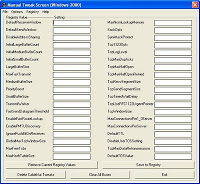
 2.In Cablenut apply the following settings


 Default Receive Window = 17520
 Default SendWindow = 8096
 Disable Address Sharing = 1 
 Initial Large Buffer Count = 10 
 Initial Medium Buffer Count = 24 
 Initial Small Buffer Count = 32 
 Large Buffer Size = 4096 
 Max Fast Transmit = 6400 
 Medium Buffer Size = 1504 
 Priority Boost = 0 
 Small Buffer Size = 128 
 Transmit Worker = 32 
 Fast Send Data gram Threshold = 1024 
 Enable Fast Route Lookup = 1 
 Enable PMTU Discovery = 1 
 Ignore Push Bit On Receives = 0 
 Global Max Tcp Window Size = 8760 
 Max Free Tcbs = 2000 
 Max HashTableSize = 4096 
 Max Norm Look up Memory = 5000000 
 Sack Opts = 1 
 Syn Attack Protect = 1 
 Tcp1323Opts = 0 
 Tcp LogLevel = 1 
 Max Dup Acks = 2 
 Tcp Max Half Open = 100 
 Tcp MaxHalfOpenRetried = 80 
 Tcp Recv Segment Size = 1460 
 Tcp Send Segment Size = 1460 
 Tcp Timed Wait _Delay = 32 
 Tcp Useb RFC1122 Urgent_Pointer = 0 
 Tcp Window _Size = 8760 
 Maximum ConnectionsPer1_0  Server = 8 
 Maximum Connections Per Server = 4 
 Default TTL = 128 
 DisableUser TOS_ Setting = 0 
 Tcp Max Data _Retransmissions = 6 
 Default TOSValue = 91


 3.Download Tcp Optimizer From: http://www.speedguide.net/files/TCPOptimizer.exe

 4.Apply the following settings in Tcp optimizer

 Max MTU - 1500 
 MTU Discovery - Yes 
 Black Hole Detect - No 
 Selective ACKs - Yes 
 Max Dup ACKs - 2 
 Time to Live (TTL) - 128 
 TCP 1323 Options - uncheck both 

 5.Apply all and restart your computer

Note: speed up idea netsetter settings may change your computer network settings. always perform the operations after creating a restore point.

Sunday, 10 February 2013

2.5GB of Free Internet By H!mesh Suthar.

RELIANCE USER Use 2.5GB of Free Internet from your RIM mobile 
By H!mesh Suthar

 Just Dial: *123*099# 

You will a confirmation msg now. 

Use the settings with APN :rcomnet

Saturday, 9 February 2013

Send Free SMS to any Airtel Number By H!mesh Suthar.

Send Free SMS to any Airtel Number By H!mesh Suthar.
   
  You can send 2 SMS daily to 2 Airtel Numbers with this trick.     
            Just send:
                         %F%and send to59191